
Download JustKaraoke – karaoke, sing, music, song, singer, party, entertainment, audio, performance, playlist
Overview
JustKaraoke 2.0, developed by TriceraSoft, presents a streamlined digital solution for managing karaoke sessions with efficiency and ease. Designed for both casual users and dedicated enthusiasts, the app addresses the common challenges of organizing song rotations, maintaining continuity across sessions, and ensuring a smooth performance flow. Its core purpose lies in transforming traditional karaoke setups into a more structured and enjoyable experience, particularly in social gatherings, home parties, or professional venues. The app’s ability to manage singer announcements and track past selections supports recurring events, allowing users to maintain rhythm and personalization over time.
Target users include individuals who host regular karaoke nights, small entertainment venues, and music lovers seeking a reliable tool to enhance their singing sessions. The app’s focus on simplicity and functionality makes it accessible to users of varying technical skill levels. While TriceraSoft is noted as the developer, no additional background information is publicly available.
The app has been available since 2012, indicating a long-standing presence in the mobile music ecosystem. This longevity suggests a stable and well-maintained product, particularly within niche markets where reliability and consistency are valued. JustKaraoke fills a specific gap in the digital entertainment space by offering a dedicated tool for karaoke management without unnecessary complexity.
Key Features & Functionality
- Vast Song Library: Access to over 10,000 streaming karaoke songs and a downloadable library of more than 70,000 tracks ensures broad musical variety. This extensive selection supports diverse genres and audience preferences, making it suitable for multi-generational gatherings or themed parties.
- Easy Singer Management: The app enables users to announce singers and navigate through performance rotations with minimal effort. It remembers previous singers and their selections, allowing for continuity in recurring events and reducing repetition.
- Multiplex and Key Options: Each singer’s preferred key and multiplex settings are saved, enabling personalized adjustments to suit individual vocal ranges and performance styles. This feature enhances comfort and confidence during singing.
- Offline Playback Capability: Users can download songs for offline use, ensuring uninterrupted playback during events in areas with poor or no internet connectivity. This is particularly useful for outdoor parties or remote locations.
- Professional-Grade Tools at an Affordable Price: Despite its robust feature set, the app remains budget-friendly at $1.99, making it accessible for home users while still offering functionality suitable for commercial use.
For example, a family gathering can use the app to rotate singers seamlessly, recall past favorites, and adjust song keys to match the vocal range of younger or older participants. Similarly, a small karaoke bar could use the app to maintain a consistent playlist and manage multiple performers efficiently. The integration of offline functionality ensures that technical issues do not disrupt the entertainment flow.
Interface, UX & Performance
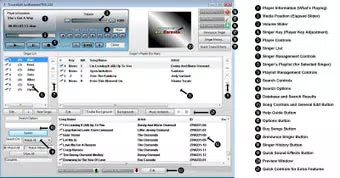
JustKaraoke features a clean, intuitive interface designed to minimize distractions and prioritize functionality. The layout emphasizes core tasks—selecting songs, announcing singers, and managing playback—ensuring that users can navigate the app with minimal learning curve. Visual elements are straightforward, with clearly labeled buttons and logical menu structures, contributing to a smooth user experience. Navigation follows a linear flow, guiding users through the karaoke session process from start to finish.
Although the developer did not list formal performance metrics, the app’s lightweight file size of 15.2 MB suggests optimized resource usage. This indicates potential for stable performance across a range of Android devices, including mid-tier and older models. Responsiveness appears to be consistent, as the app supports both real-time streaming and offline playback without reported delays.
Stability is likely maintained through years of updates, though specific update frequency was not disclosed. The app’s ability to remember user preferences and settings across sessions reflects a well-structured backend architecture. Overall, the UX is focused on usability, allowing users to concentrate on the entertainment rather than technical operations.
Platform Compatibility & Technical Requirements
JustKaraoke is available exclusively on the Android platform. The current version is 2.0, with a file size of 15.2 MB, indicating a lightweight and efficient application. While the app has been available since 2012, specific minimum OS requirements were not listed by the developer.
This lack of detail means users should verify compatibility with their device’s Android version before installation. The absence of iOS availability suggests a targeted focus on the Android ecosystem. Given the app’s long release history, it may still function on older Android versions, though newer features may require updated system software.
Users are advised to check their device specifications to ensure optimal performance.
Pros and Cons
Pros
- Extensive song library with both streaming and downloadable options
- Intuitive interface designed for quick learning and use
- Offline playback support for uninterrupted sessions
- Personalized settings retention for singers and song keys
- Cost-effective pricing for professional-grade functionality
Cons
- Platform availability limited to Android only
- Minimum OS requirements not specified by the developer
- No information on update frequency or future development plans
- Interface may appear dated compared to modern design standards
- Limited social or sharing features for event coordination
FAQ
Is JustKaraoke available on iOS?
Currently, the app is only available for Android devices. There is no official iOS version listed by the developer.
Can I use JustKaraoke without an internet connection?
Yes, the app supports offline playback. Songs can be downloaded for use when internet connectivity is unavailable.
How large is the song library in JustKaraoke?
The app provides access to over 10,000 streaming songs and a downloadable library of more than 70,000 tracks.
Does the app remember my previous singer selections?
Yes, JustKaraoke saves past singer choices and settings, allowing for continuity across sessions.
Is the app secure to download and install?
As a product from TriceraSoft and distributed through official Android channels, the app is considered secure. Users are advised to install only from trusted sources.
Final Thoughts
JustKaraoke 2.0 stands out as a reliable, no-frills tool for managing karaoke sessions with precision and ease. Its combination of a vast song library, offline functionality, and personalized settings makes it a valuable asset for anyone hosting a singing event. The app’s affordability and long-standing presence in the market underscore its durability and user trust.
While it lacks modern design polish and cross-platform availability, its core functionality remains strong and purpose-built. For home users, party hosts, and small venues seeking a dependable karaoke solution, JustKaraoke delivers consistent performance without unnecessary complexity. The focus on usability and practicality ensures that the spotlight stays on the music and the fun.
Download JustKaraoke now


